Surfshark Antivirus Review: Main Features
Our team’s research highlights these as the key features:
- Real-time antivirus protection with Cloud Predict
- Web Protection helps block malicious and phishing threats
- Customizable scheduled scans
- Lightweight design
- Webcam protection
- Database updates every 3 hours
- 30-day money-back guarantee (in bundle)
Surfshark Antivirus is not a standalone service. Instead, you must subscribe to a Surfshark One or Surfshark One+ bundle to access it. That gives you access to protection features alongside the antivirus software.
Surfshark Antivirus Compatibility and System Requirements
Surfshark Antivirus supports a range of operating systems: Windows, macOS, and Android. It is designed to be lightweight, with Surfshark stating that the app is designed to avoid excessive CPU and RAM use. The current system requirements are as follows:
- Windows 10 and newer
- macOS Big Sur 11 and newer
- Compatible Android devices
As Android requirements can vary based on the app version and device, check Surfshark’s current system requirements to confirm compatibility before subscribing. It is important to note that this antivirus is not compatible with Android devices that do not use 64-bit architecture. Surfshark’s antivirus is not available on iOS; however, the Surfshark One and Surfshark One+ bundles include a VPN and security features that are available on iOS.
Reviewing Surfshark Antivirus: Pros and any Drawbacks
Certain features will be more important to you than to other people, so it’s important to find out if Surfshark Antivirus offers what you’re looking for. Here are the pros and potential limitations.
Real-Time Protection
The antivirus runs continually in the background, checking apps and files during downloads, installation, and use. This real-time protection is designed to help detect malware before it can affect your device.
On compatible systems, Surfshark also offers external storage scanning for devices such as USB drives. As with any antivirus software, however, no solution can guarantee protection against every threat.
Detects Malware Better
Surfshark Antivirus uses Cloud Predict, a cloud-based feature designed to help identify new malware, including zero-day (brand new) threats. The cloud-based approach adds another method of detecting suspicious files alongside the antivirus software’s other protection features.
Also, Surfshark updates its malware database every three hours to keep its threat information current.
In addition, Surfshark Antivirus uses heuristic scanning to help detect malware that hasn’t yet been identified. That can be useful for detecting zero-day threats. It has anti-tamper protection, too, designed to help prevent unauthorized changes to the antivirus.
Finally, boot sector scanning checks for threats that may execute before your operating system loads, helping identify them early on.
Does Surfshark Antivirus sound like a good fit for you? See what else buyers have to say.
See Buyer Reviews
Certified Device Security
Independent testing provides another way to evaluate Surfshark Antivirus. AV-TEST, an independent security testing company, has tested and certified this antivirus.
In its June 2026 Windows 11 testing, Surfshark Antivirus scored 6/6 for Protection, 4.5/6 for Performance, and 6/6 for Usability. These results show that it earned AV-TEST’s highest score in the Protection and Usability categories during that test.
Test results can change over time, so it is worth checking the latest results when comparing antivirus products.
Web Protection Feature
A valuable Web Protection feature is part of Surfshark Antivirus on Windows. It runs in the background and is designed to help protect against malware and phishing websites before you download something or enter information online.
Web Protection checks URLs accessed through your browser or other programs and blocks those it identifies as malicious. You can also exclude specific sites from Web Protection using the Exclusions list.
No Dedicated Firewall
There is no dedicated firewall included with the antivirus. However, a VPN is included with Surfshark One and Surfshark One+ bundles, while operating system such as Windows and macOS have their own built-in firewall features.
A VPN and a firewall perform different functions, so the included VPN should not be considered a replacement for a firewall. Whether the lack of a dedicated firewall matters to you may depend on the other security tools you already use.
Webcam Protection
Another useful feature is Webcam Protection, available on Windows and macOS. It is designed to help prevent unauthorized apps from accessing your webcam.
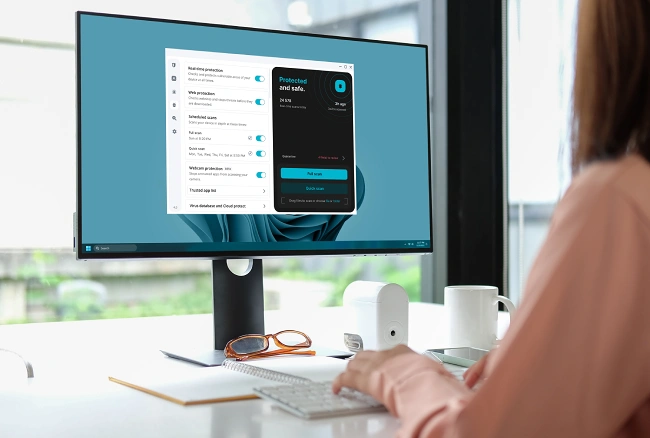
You can create a trusted app list to control which applications can access your camera. Apps that are not on your trusted list can be prevented from accessing it, giving you more control over webcam access.

Number of Devices
Up to five devices per account can use Surfshark Antivirus. This number may be enough for some users, although it may not be enough for multiple family members who each have phones, laptops, and perhaps tablets too. For those who use this antivirus, there is a lot to be said for its cross-platform coverage across Windows, macOS, and Android under one subscription.
Scheduled and Manual Scans
Customize the scheduled scan settings based on how and when you want scans to run. On desktop, Surfshark Antivirus offers quick, full, and custom scans, along with scheduled scanning.
You can also start a manual scan when you decide to. Available scan options vary somewhat by operating system. For example, Android includes real-time protection, daily scans, storage scanning, excluded apps, and manual scanning.
Speed and Additional Features
Surfshark describes its antivirus as lightweight and designed not to use excessive CPU or RAM. The effect antivirus software has on device performance can vary, however, depending on the system, scan type, and other factors.
Quick scans focus on selected areas and generally require less scanning than full scans, while in-depth scans examine more files and can take longer. On compatible desktop systems, you can also use a custom scan if you only want to check certain files or folders.
Ease of Use
Surfshark Antivirus has a clean look and straightforward navigation. Features such as Web Protection, scheduled scans, and exclusions can be managed within the Surfshark app. That may make it useful for those who do not have advanced tech knowledge.
There is also an option to automatically delete quarantined files after 60 days, so you don’t have to manage them manually. You can also review quarantined files and restore them when appropriate.
Pricing and Plans
Regular discounts on the initial subscription period can help users save money, although prices and promotions can change. Both Surfshark One and Surfshark One+ bundles include Surfshark Antivirus. Renewal pricing may be higher than introductory pricing, so check the current price and renewal terms before subscribing.
The Surfshark One bundle includes Surfshark Antivirus, a VPN, Alternative ID, Alert, and other privacy and security features. Alternative ID enables you to create an alternative online identity and proxy email, while Alert monitors selected personal information and alerts you if it appears in a data leak. This bundle may appeal to general users looking for online privacy and antivirus tools in one convenient package.
Surfshark One+ is the more comprehensive plan of the two options and includes everything in Surfshark One, including Surfshark Antivirus, as well as Incogni. Incogni is a personal data removal service that sends data removal requests to data brokers and people-search sites on your behalf.
Surfshark One+ may suit individuals and families who prioritize privacy and want more control over their personal information online.
30-Day Money-Back Guarantee
After signing up for an eligible Surfshark plan that includes the antivirus, a 30-day money-back guarantee gives you time to decide if it’s right for you. For eligible subscriptions purchased directly through Surfshark, you can request a refund within 30 days of your initial purchase, provided you meet the company’s terms.
Additional Antivirus Features
Surfshark Antivirus also includes additional security features depending on your operating system. For example, compatible systems offer features such as external storage scanning, exclusions, quarantine management, and regular virus database updates.
Feature availability differs across Windows, macOS, and Android. For example, Web Protection is currently available on Windows, while Webcam Protection is available on Windows and macOS. Checking which features are supported on your device can help you determine what to expect before subscribing.
Customer Service
If you have issues using the antivirus in your subscription, it’s nice to know that Surfshark offers 24/7 customer support. There are live chat and email options, depending on what you like best. The around-the-clock service means you can ask a question when it’s convenient with your schedule, even in the middle of the night.
Conclusion: Surfshark Antivirus Review
For those looking for a lightweight and user-friendly antivirus solution with a range of security features, this one from Surfshark may be the right choice. It has real-time scanning, Cloud Protect for additional malware detection, scheduled and manual scans, and Web Protection on Windows.
There is Webcam Protection on Windows and macOS, too. While there is no dedicated firewall and the five-device limit may not suit everyone, Surfshark Antivirus offers several useful security features, including real-time protection, regular malware database updates, and customizable scans.
Also, eligible subscriptions come with a 30-day money-back guarantee, subject to terms. This antivirus is part of a broader security and privacy bundle that offers additional features, such as a VPN and data leak monitoring. We recommend Surfshark Antivirus for its range of useful features and the convenience of having antivirus protection alongside the bundle’s other privacy and security tools.